

If you use Advanced Inventory in QuickBooks Enterprise, there is a setting to require serial numbers in QuickBooks when transactions are entered.
How to Enable
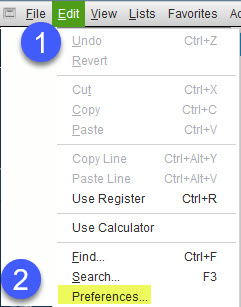
First, you must enable this new feature in preferences. From the menu at the top, select Edit > Preferences.
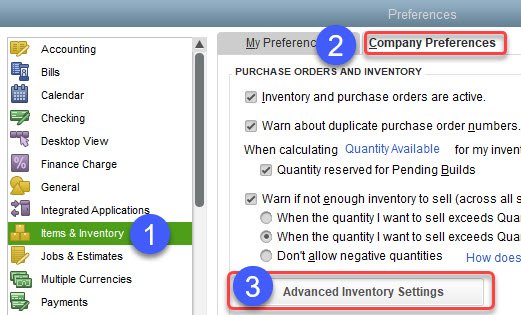
Then on the left, select Items & Inventory, click on the Company Preferences tab, and finally on Advanced Inventory Settings.
| From the top menu select Edit > Preferences |
| 1. Items & Inventory (on the left) |
| 2. Click the Company Preferences Tab |
| 3. Select Advanced Inventory Settings |
You will now see the Advanced Inventory Settings window. Select the Serial/Lot Numbers tab.
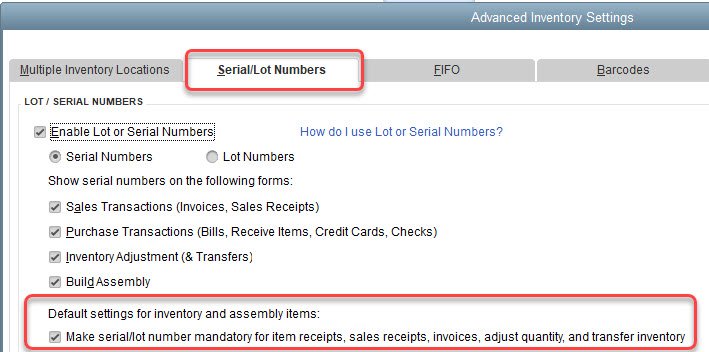
What happens when you Require Serial Numbers in QuickBooks?
Selecting this new option will require serial/lot numbers when entering the following transactions:
| Transactions |
|---|
| Item Receipts |
| Sales Receipts |
| Invoices |
| Adjust Quantity |
| Transfer Inventory |
Find more information on Lots and Serial Numbers here.
See my other posts on inventory.